
1. Review
See each tab’s workspace, its status and the reason it stays awake. Uncheck any ready tab you want to keep loaded.
THE SILL BROWSER
Meet SillMeet Glide and Workspaces. Follow the build.Sill DeskSaved layouts, project shelves and separate sign-ins.Sill WorkspacesEvery project at home. Safe tabs sleep; unfinished work stays awake.Every featureExplore the tools built into Sill.Appearance & settingsSearch settings. Preview a smaller chrome.Sill GlideYour frame, only when you need it.See it in actionBrowser captures and responsive views.Get SillPortable Windows x64 beta.A compact browser for developers and people who get things done.
Explore Sill GlideMAKE ROOM FOR YOUR WORK
Sill DeskSaved layouts, project shelves and separate sign-ins.Sill WorkspacesNamed projects, intelligent sleeping and unfinished-work protection.Focus with GlideHover, pin and choose your edge.Protection & autofillWork with your saved data and fewer distractions.Developer toolkitColors, captures, Inspect and shortcuts.Make it yoursChrome size, themes and searchable settings.Named tab sets, intelligent sleeping and protection for unfinished work. Pair Workspaces with Glide to make room for the page.
Explore Sill WorkspacesGET COMFORTABLE WITH SILL
Development logFollow the build from day one.Subscribe by RSSDevelopment updates in your feed reader.Setup & helpDownload, import, update and troubleshoot.Privacy & storageUnderstand what stays on this computer.Screenshot galleryDesktop, tablet and phone website views.Beta capabilitiesWhat works today and current limits.Straightforward answers about your browser, your profile and your tools.
Read the guideSill Airlock
See which inactive pages can pause, keep protected pages running, and review the result.
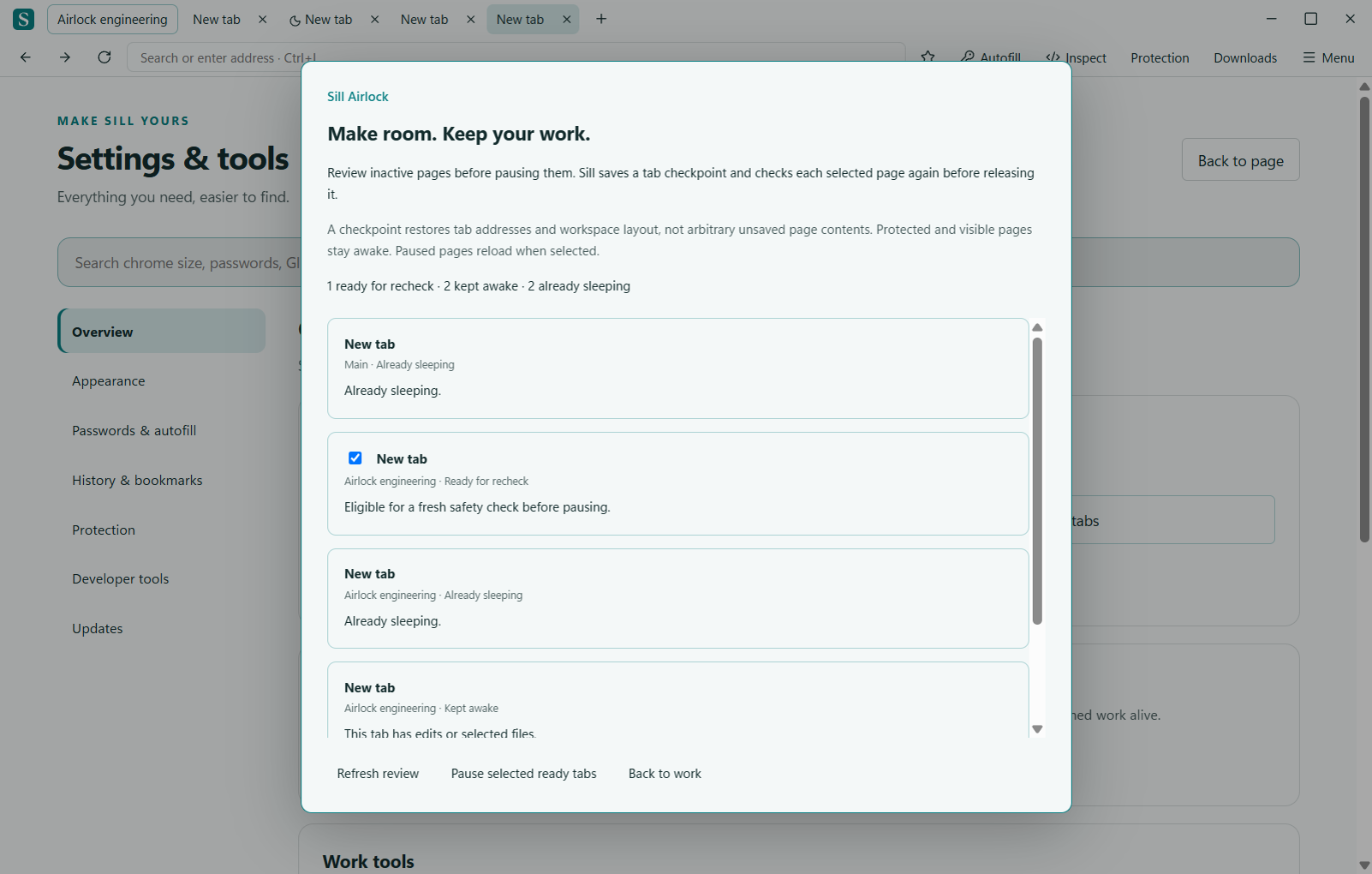
Open Airlock with Ctrl+Alt+A, from Menu → Overview, or by searching Airlock in the command palette. It checks loaded pages without reopening sleeping tabs. Visible pages remain awake. Pages with edits, forms, editors, media, uploads, embedded content or uncertain state are protected.
Choose the ready tabs you want to pause. A ready label is provisional: it means the page passed the review, not that Sill will skip the final check.
See each tab’s workspace, its status and the reason it stays awake. Uncheck any ready tab you want to keep loaded.
Sill writes its recovery journal before pausing selected pages. If that write fails, the operation stops before releasing any tab.
Page activity and identity are checked again. A tab that moved, navigated, became active or gained protected activity is skipped.
The result lists which selected tabs paused and which stayed awake. Pages can decline unloading; Sill respects that decision. Selecting a paused tab reloads its address. Nothing is forced through a page’s unload warning.
Airlock runs when you ask for a review. It does not add continuous page monitoring of its own or promise a particular amount of memory savings.
The planner separates read-only inspection from apply. A single-use token binds an expiring, 60-second plan to captured tab keys, workspace membership, addresses and WebContentsView identity. Apply requires a successful session-journal write, then repeats the safety probe and checks identity across the asynchronous boundary before using Sill’s guarded renderer-close path.
DOM probes time out conservatively after 1.5 seconds per check. Failed or uncertain checks keep the page resident. Reviews include up to 200 tabs, and apply refuses a session larger than the journal’s 200-tab limit. The operation is intentionally partial: one page changing does not force other pages to close.
The existing journal stores tab addresses, workspace structure, saved layouts and project notes. It is not a snapshot of a running web application and does not capture arbitrary form contents, files or custom editors. Airlock’s plan and receipt stay in memory; its inspection does not collect field values.
Use optional text draft recovery for eligible opted-in fields. Work that needs its live page remains in memory while Sill is open. The checks reduce risk; they cannot establish that every website’s internal state is recoverable.
Recovery and local storage · Workspace behavior · Sill Glide