
Beta33 · Compact tab overlap fixed
Long titles now truncate inside each tab. Close controls retain their space, and hover tooltips show the full title and URL. Tested at 20 window-width and density combinations.
Beta32 · Work with selected downloads
Bulk pause/resume, pin/unpin, file checks, confirmed cancellation, assignment to an existing workspace, file-type filtering, selected manifest export, and unsaved editor protection during list refreshes.
Explore Download DeskBeta31 · Sill Download Desk
Project-aware downloads, pinned records, local notes, file presence checks, SHA-256 baseline and publisher comparisons, filtered JSON manifests, and visible download-history save retries.
Explore Download DeskRelease notes
Getting ready.
Getting stronger.
Sill is still a Windows beta. Each release makes the workspace more dependable.
0.1.0-beta.30 · October 13, 2026
Sessions larger than 200 tabs now fail checkpoint saving explicitly and retain the previous journal and backup. The recovery card explains the limit and how to retry. Quitting checks the checkpoint and warns when changes since the previous save may not return; Keep working leaves the current pages open.
Validation: 59 unit tests, seven packaged recovery-interface checks and ten Airlock checks passed. The general browser fixture passed 23 functional checks; its final screenshot capture failed in the remote graphics session. New recovery screenshots were captured successfully through Electron’s developer protocol. See the warnings and recovery limits.
0.1.0-beta.29 · October 13, 2026
Sill Desk and searchable settings now show the current session checkpoint status and last successful save time. Storage-full and file-access failures have specific guidance and a retry button. A failed save keeps the previous successful timestamp; the status contains no file paths, tab addresses or note contents.
Validation: 58 unit tests, four packaged recovery-interface checks and ten packaged Airlock checks passed. See the recovery interface and its limits.
0.1.0-beta.28 · October 13, 2026
Session recovery writes now use unique temporary files and bounded retries for Windows sharing violations. Failed writes and syncs clean up their temporary files. Repairing a corrupt journal retains the last valid backup.
Airlock still requires a saved recovery checkpoint before pausing tabs. A packaged test blocked the checkpoint replacement and confirmed the tab remained loaded; a fresh review succeeded after the lock was removed.
Validation: 57 unit tests, ten packaged Airlock checks, eight draft-protection checks and two abrupt-exit recovery checks passed. Storage faults were injected in tests; this does not establish recovery after every power-loss scenario.
0.1.0-beta.27 · October 12, 2026
Airlock’s shortcut now preserves the original page as its return context. Opening from settings still returns to settings. The frontend captures context before expanding the browser shell; the shortcut no longer opens an intermediate settings panel.
Nine Airlock browser integration checks passed, including the actual tool dispatcher entry path.
0.1.0-beta.26 · October 12, 2026
Sill Airlock adds a tab pause planner with per-page protection reasons, a required recovery checkpoint, expiring plans, final activity/identity checks and an operation receipt. A failed checkpoint write prevents all selected unloads. Renderer safety probes now fail conservatively on timeout.
0.1.0-beta.25 · October 12, 2026
The command palette now filters tabs, workspaces and actions; ranks title matches ahead of URL matches; prioritizes the current workspace; and shows a clear keyboard selection. Arrow keys and Enter switch projects without a mouse. Live state changes keep the selected result, and empty searches explain what to try next.
Verified with 44 unit tests, 23 packaged browser regressions and four command-palette checks. Still an unsigned Windows portable beta; signing and Windows 10 validation remain pending.
0.1.0-beta.24
October 12, 2026 · Left and right Glide rebuilt as organized workspace panels.
- Workspace header, dedicated navigation/address, independently scrolling tabs, labeled tool grid and a stable menu/pin footer.
- Live side sizing from 336 to 248 pixels wide, with a 310-pixel balanced default. The side slider and Appearance slider share the saved preference.
- Pinned page bounds track the actual panel width. Unpinned panels remain overlays, with full-width pages and the existing delayed retreat.
- Fresh browser screenshots and real recordings for both top and side size sliders.
0.1.0-beta.23
October 12, 2026 · Redesigned settings and a live chrome-density slider.
- Category sidebar, grouped cards, keyboard navigation and settings search that takes you to a matching control.
- Real-time chrome sizing from 88 to 36 pixels. The balanced default is 72 pixels; compact top controls consolidate into one row.
- Secondary tools remain under More. Page text keeps its size. Density saves on release instead of writing preferences every frame.
- Pinned top Glide and page insets follow chrome size. Side Glide stays vertical; hidden chrome remains clipped.
0.1.0-beta.22
October 12, 2026 · More reliable project notes, clearer draft recovery and faster command search.
- Notes save to the workspace where you edited them, even if you switch before the save finishes.
- Recovery follows unique field identities after a page inserts other inputs. It reports restored fields and keeps existing text.
- Site opt-in stays synchronized across tabs sharing a session. Encrypted backups support recovery after a damaged file; discard and disable remove retained draft copies.
- Command search accepts several words in any order and shows an empty-result explanation.
- Build setup grants the packaged runtime Electron’s required Windows sandbox read/execute permission. Signing and broader platform validation remain pending.
0.1.0-beta.21
October 12, 2026 · Sill Desk adds saved split layouts, optional separate workspace sign-ins, project shelves, local notes, resource counts and starter templates. Pinned reference tabs and the Ctrl+Shift+P command palette are included. Opt-in encrypted HTTPS text drafts can be restored after restart into matching empty fields. Sensitive fields, frames and custom editors are excluded. Closed launcher output pipes no longer terminate Sill.
0.1.0-beta.20
October 12, 2026 · Search workspace names, tab titles and URLs; jump directly to tabs across spaces; arrange workspace order and restore it after restart. The workspace manager remains inside the window with all Glide layouts.
0.1.0-beta.19
October 12, 2026
The Workspaces dialog now appears above the webpage from Ctrl+Alt+W and the workspace button, including all Glide edges. Closing restores the previous page or menu. Atomic storage uses unique temporary files and retries Windows sharing locks; background history saves retry without terminating Sill.
0.1.0-beta.18
October 12, 2026
Sill Workspaces introduces named tab sets, quick switching, last-selected tab retention, moving and merging tabs, workspace shortcuts and session restoration. Inactive spaces unload verified safe pages while keeping unfinished work alive.
Meet Sill, a six-entry development journal, RSS and confirmed email updates now introduce the browser and its ongoing development.
0.1.0-beta.17
Saved logins, addresses and cards now fill automatically on matching HTTPS forms. A themed dropdown beside the form shows the selected entry and alternate choices. Switching remembers your preference for that site; staged sign-ins use the selected account.
Glide stays clipped during its entire reveal and retreat, preventing the brief scrollbar flash. The Glide animation and pinned browser captures have been refreshed. Transparent chrome backgrounds show the selected theme color through their clear areas.
Validated with 26 unit tests and focused browser checks for staged logins, account switching, form origin boundaries, address groups, cards and all three Glide edges.
0.1.0-beta.16
Your page tools are a right-click away. Open links and images in new tabs, view CSS background images, copy addresses and save media. New Screenshot and Developer tools submenus offer visible-page, selected-area, full-page and scroll-first captures, Inspect, a color picker and page details.
Appearance now includes a local chrome background: choose a PNG, JPEG or WebP image, adjust fill, fit or tile, position and strength, or remove it. Backgrounds work with themes and all three Glide edges. Large images are resized and controls keep their theme colors.
The Windows build passed 23 unit tests, 23 packaged browser regression checks and six focused checks covering context-menu actions, screenshots, developer tools, background persistence and Glide layouts.
0.1.0-beta.15
Protection-list downloads now use a different network transport to address a reported main-process network error. Interrupted downloads, timeouts and oversized responses fail cleanly while existing protection stays active.
This build passed 23 unit tests, 23 packaged browser checks and a live update of all 17 protection lists. The exact originally reported assertion was not reproduced.
0.1.0-beta.14
Protected tab sleeping, tab recovery after restart, local file backups, more precise site permission prompts, verified update ZIP downloads and an updated browser engine.
Tabs restore their addresses and order; unsaved form contents are not stored. Pages that may contain unfinished work stay awake.
0.1.0-beta.13
Fixed hidden Glide scrollbars. Pinned controls reserve space for your page. Refreshed website navigation, responsive layouts and the captured Glide animation.
Before v1
Signing, installer upgrade tests, signed update recovery, real-world compatibility testing and external beta feedback remain part of launch preparation. Portable beta updates are manual. Sill currently targets Windows x64; phone and tablet views show this website.
Get the Windows betaEight illustrated themes
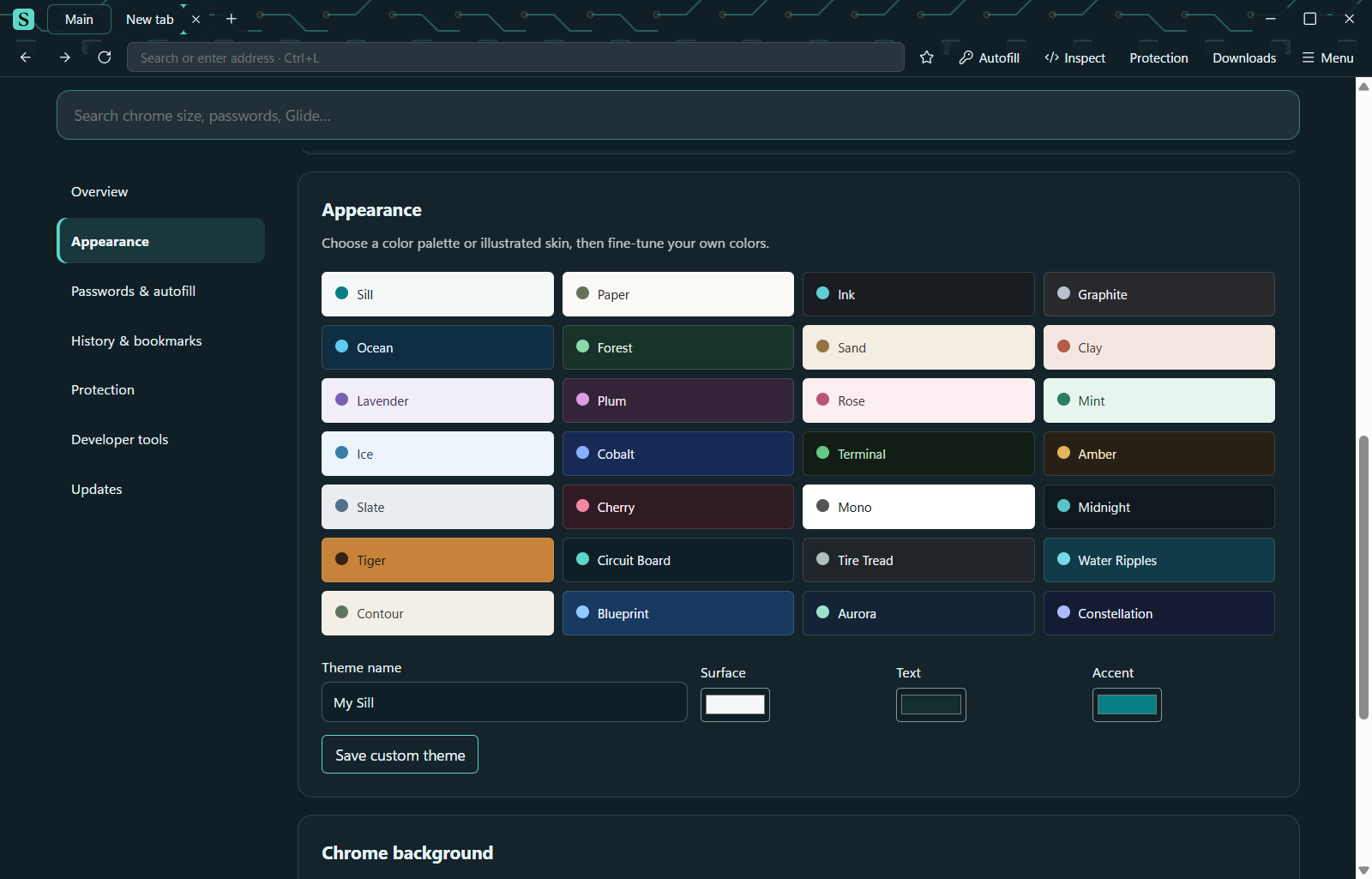
Tiger, Circuit Board, Tire Tread, Water Ripples, Contour, Blueprint, Aurora and Constellation join the twenty plain-color themes. Transparent PNG artwork has dedicated top and side layouts.
Windows may show “Windows protected your PC” because this beta is unsigned. See the illustrated first-launch guide before deciding whether to run it.