
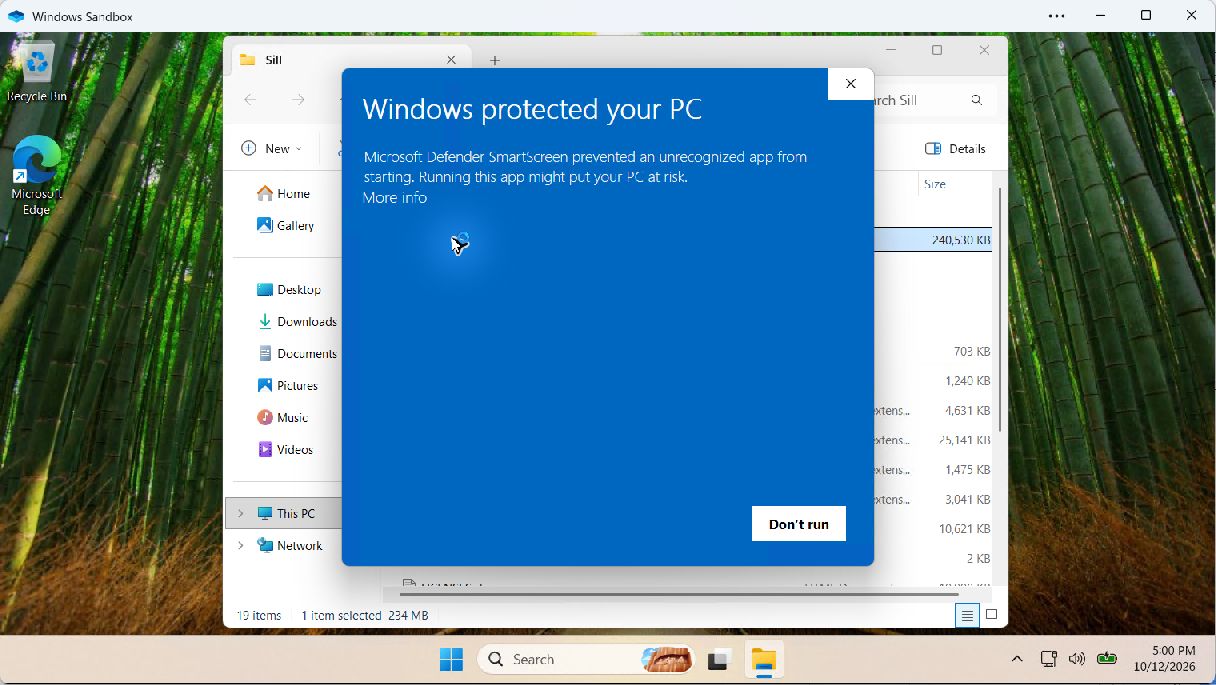
1 Read the warning, then choose More info
More info reveals the application name and publisher. Opening those details does not start Sill.
THE SILL BROWSER
Meet SillMeet Glide and Workspaces. Follow the build.Sill DeskSaved layouts, project shelves and separate sign-ins.Sill WorkspacesEvery project at home. Safe tabs sleep; unfinished work stays awake.Every featureExplore the tools built into Sill.Appearance & settingsSearch settings. Preview a smaller chrome.Sill GlideYour frame, only when you need it.See it in actionBrowser captures and responsive views.Get SillPortable Windows x64 beta.A compact browser for developers and people who get things done.
Explore Sill GlideMAKE ROOM FOR YOUR WORK
Sill DeskSaved layouts, project shelves and separate sign-ins.Sill WorkspacesNamed projects, intelligent sleeping and unfinished-work protection.Focus with GlideHover, pin and choose your edge.Protection & autofillWork with your saved data and fewer distractions.Developer toolkitColors, captures, Inspect and shortcuts.Make it yoursChrome size, themes and searchable settings.Named tab sets, intelligent sleeping and protection for unfinished work. Pair Workspaces with Glide to make room for the page.
Explore Sill WorkspacesGET COMFORTABLE WITH SILL
Development logFollow the build from day one.Subscribe by RSSDevelopment updates in your feed reader.Setup & helpDownload, import, update and troubleshoot.Privacy & storageUnderstand what stays on this computer.Screenshot galleryDesktop, tablet and phone website views.Beta capabilitiesWhat works today and current limits.Straightforward answers about your browser, your profile and your tools.
Read the guideWindows portable beta · First launch
Sill’s current beta is unsigned. Windows may ask you to make a trust decision before opening it. Here is what that screen means and how to check your download.
Microsoft Defender SmartScreen checks the reputation of downloaded applications. A new or little-downloaded build can be unrecognized. Sill’s current beta also lacks a publisher code signature, so the details can say Unknown publisher.
This warning is not, by itself, a malware detection. It is also not proof that the file is safe. Download only from sillbrowser.com, check the release details, and proceed only if you trust that download. Signing is being arranged; the current beta remains unsigned.
Microsoft explains download reputation and code signing. A signature does not guarantee that every new build will avoid a reputation warning.
A portable ZIP does not use an installation wizard. Sill saves its profile separately in your Windows user account. Close an older Sill build before opening a newer one.
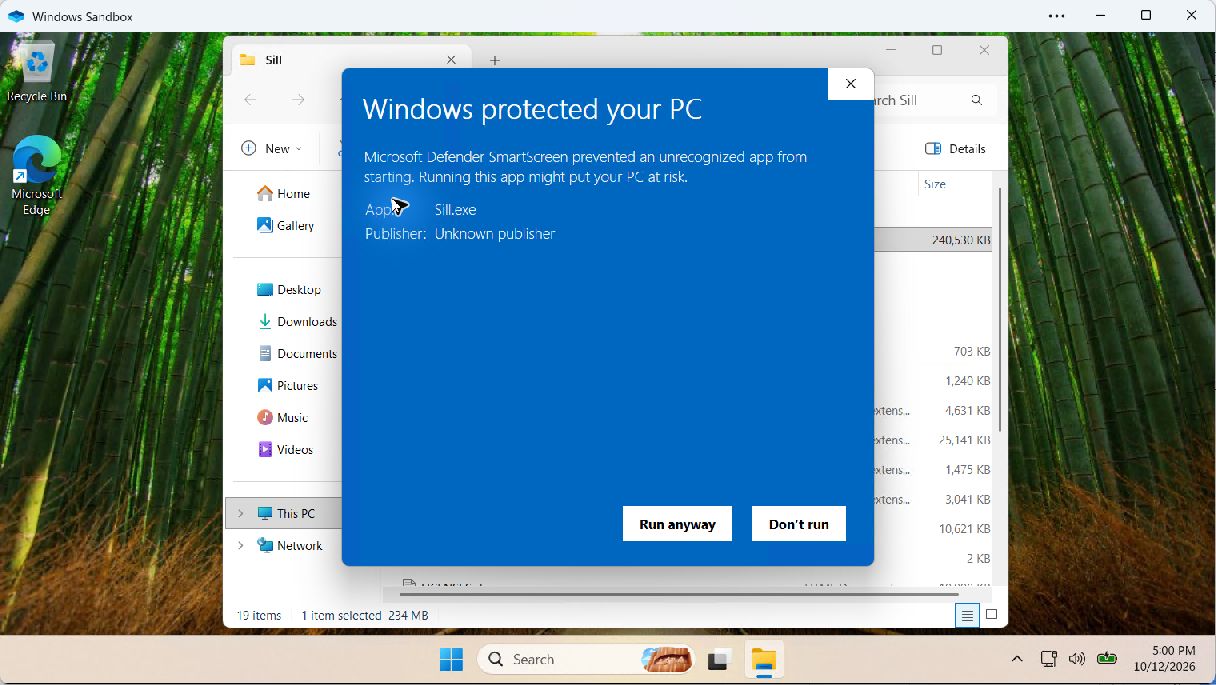
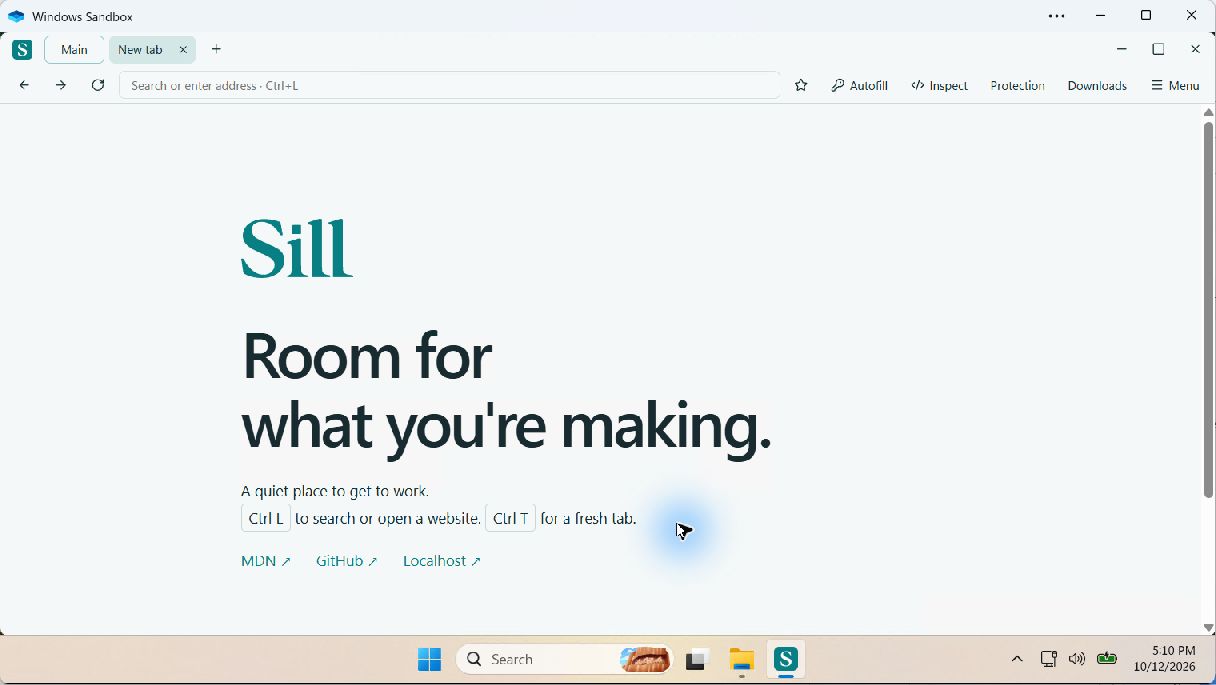
These are actual Windows 11 Sandbox captures of beta24. Your layout or wording may vary by Windows version and device policy.
More info reveals the application name and publisher. Opening those details does not start Sill.
Check that App says Sill.exe. Unknown publisher is expected for this unsigned beta. If it is the official download you intended to open and you trust it, choose Run anyway to allow this launch. Otherwise choose Don’t run.
You should now see Sill's start page. This is beta24 running in the same isolated Windows Sandbox after the warning.
Keep Windows protections enabled. You do not need to disable SmartScreen or antivirus, add exclusions, or run Sill as administrator.
Smart App Control or an organization’s device policy may block unsigned apps and offer no override. This guide cannot change that. Keep those protections enabled; contact your device administrator or wait for a signed release. Microsoft’s Smart App Control guidance explains this distinction.
That is different from an unrecognized-app reputation warning. Do not use these steps to dismiss a threat detection. Stop and contact Sill support with the exact message, build version, and download source. Never send passwords or your browser profile.
Choose Don’t run. Return to the official Sill download page and check the current release. A familiar filename alone does not establish the source or integrity of a file.
The current release manifest lists the ZIP’s SHA-256 hash. Advanced users can compare it with Get-FileHash -Algorithm SHA256 in PowerShell. Match the hash for the exact version you downloaded; a matching hash checks consistency with the manifest, not a guarantee of safety.
Continue to setup & help Read current limitations
Windows 11 first-run screenshots. Windows 10 validation is still pending. No macOS, Linux, phone or tablet browser build is currently available.